
Based on some great user feedback I've made these tweaks to the UI:
- Two new options in the Display menu: a Perspective toggle switches between perspective and orthographic projection, and Standard views checkboxes (INIT, X, Y, Z) snap the camera to preset orientations.
- Delete confirmation — clicking the × button on a geometry or material tab now asks for confirmation before removing it.
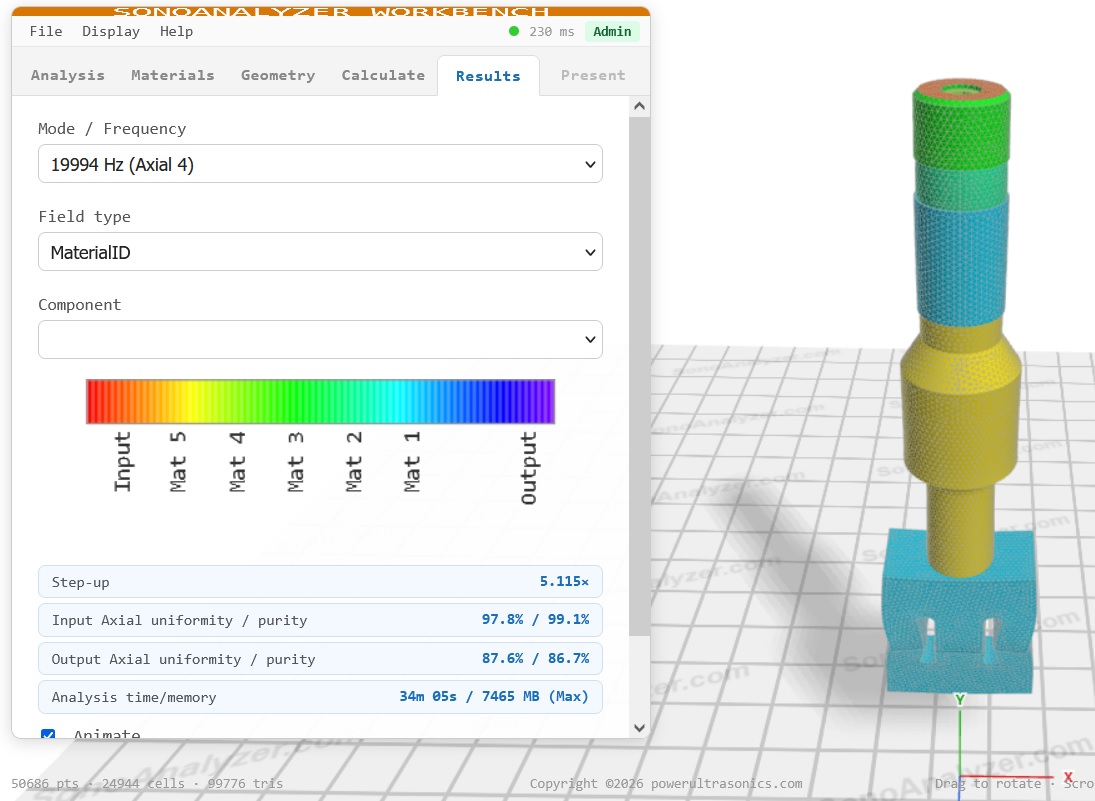
Also, finishing off the set of examples I've combined the slotted block sonotrode, booster and transducer into a complete stack. I generally don't recommend analyzing ultrasonic systems complete - it's much more efficient to work on each half-wavelength section individually - but sometimes it needs to be done, for example when searching for reasons for anomalous behaviour involving more than one part.
To see how this works in version 3:
- For each example part you want to use, click File -> Save to save it locally as a .sa3 file
- Load the sonotrode of your choice.
- Go to the Geometry tab, click + New blank tab.
- Under the Shape selector, pick Load .sa3 file and choose the booster.
- Repeat for the transducer.
And that's it. Parts stack automatically.
As for any multi-material analysis, a Pro or Max plan is required to run it. You can see the analysis time and maximum memory usage on the Results tab. At the default element size (4 mm) the result for my analysis run was 11 minutes and 2950MB. This is comfortably within the limits for a Pro plan, but note that as for the transducer, modified quadratic elements are used. At this element size the lack of curvature within the elements is much less noticeable and will have only a minimal effect on the results.
But I couldn't just leave it there so I pushed the mesh down to 2.8mm and ran it again. At this mesh size with very large geometry the memory usage moved out of the Pro limits into Max - 34 minutes and 7465MB. But comparing the results there's less than 30Hz difference in the main axial resonant frequency - the Pro analysis remains a very close approximation.
The two stack results: 4mm Pro and 2.8 mm Max can be downloaded from the Examples menu.